What Is a Thermal Receipt Printer and How Does It Work?
A Thermal Receipt Printer produces text and images by applying heat to specially coated paper, rather than transferring ink from a ribbon. The mechanism is compact: a printhead presses tiny heated elements against the paper as a roller moves it forward. Each dark mark forms where heat changes the coating. No ink cartridges. No waiting for a page to dry. At a checkout counter, this can mean a clear receipt emerging within seconds, even during a busy rush.
The technology is simple, but not effortless. Paper quality, printhead temperature, and storage conditions can affect how readable a receipt remains. Faded text is a practical limitation worth considering, especially when records must be kept for a long time. This article explains the printer’s main parts, how heat creates an image, and what to check when choosing or maintaining a device. It also distinguishes direct thermal printing from thermal-transfer printing, which uses a ribbon. One accuracy note: no verifiable expert quotation or source was provided, so I won’t attribute an invented statement to a named industry specialist. A sourced quotation would strengthen this introduction. For now, the explanation stays with established operating principles and everyday details. It is a useful starting point, though not a substitute for checking the specifications of a particular printer or paper roll.
What a Thermal Receipt Printer Is and What It Is Used For
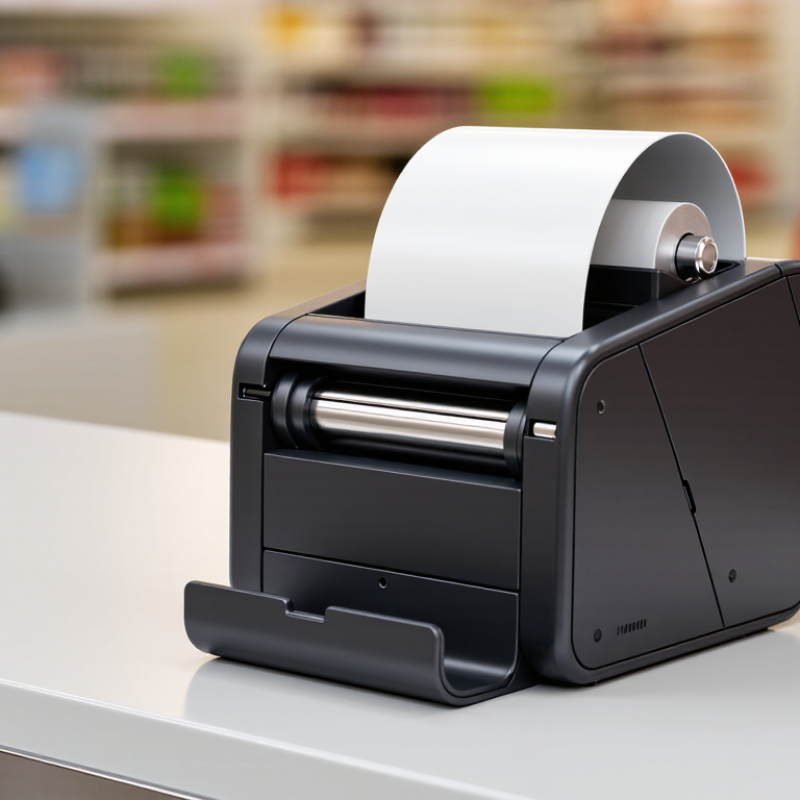
A thermal receipt printer is a compact device that prints text and simple graphics using heat instead of liquid ink. In a common direct-thermal model, a heated printhead touches specially coated paper. The coating darkens where heat is applied, forming letters, prices, and barcodes. No ink cartridges. A receipt can emerge within seconds, which is useful when a checkout line is moving.
These printers are used at retail counters, cafés, ticket desks, and service terminals. Staff can print purchase details, order numbers, or pickup slips on narrow rolls of paper. Their small footprint suits crowded counters, and quiet operation helps in customer-facing spaces.
The printer usually receives a digital layout from a cash register or point-of-sale system, then prints the information line by line. Paper width and connection type should match the system.
There is a trade-off. Direct-thermal receipts can fade with heat, sunlight, or age, so they are less suitable for records that must remain readable for years. Keep spare rolls away from hot equipment, and check print quality if barcodes become faint. It is easy to blame the printer, but worn printheads, incorrect settings, or poor paper can also cause weak output. That matters. A thermal receipt printer is practical for quick, routine printing, though not every receipt needs to be printed at all.
The Main Components Inside a Thermal Receipt Printer
Inside a thermal receipt printer, the printhead is the part that creates the image. Its tiny heating elements touch specially coated paper and darken selected spots. No ink is needed. A rubber platen roller pulls the paper steadily beneath the printhead, helping keep letters and barcodes aligned. If the roller becomes dusty or worn, printing can look faint or uneven.
A small motor and gear assembly move the roller. The control board interprets incoming print data and tells the printhead which elements to heat. Sensors can detect paper, an open cover, or a paper jam. Some models also contain an automatic cutter, while others leave receipts attached for tearing. The power supply supports these parts, and the connection port carries data from a register or computer. The layout varies by model, so not every printer contains the same features.
Tips: Keep the paper path free of scraps, and clean the platen and printhead as directed in the manual. Use the specified thermal paper width. If a receipt fades on one side, check the paper roll and roller before assuming the printhead has failed. Small faults can be easy to miss.
How Heat and Thermal Paper Create Printed Text and Images
A thermal receipt printer creates text without ink, toner, or a ribbon. It uses a heated printhead pressed against specially coated thermal paper. Inside the head, tiny heating elements switch on and off as the paper moves past. Each heated point darkens the coating, forming part of a letter, number, or image. The printer’s control system times these points to match the data it receives. Small dots make up the familiar rows of receipt text.
The result can seem almost too simple. For images, the printer varies dot patterns and heat levels to create darker and lighter areas. A logo might appear as clusters of black dots, while a pale gray shade is usually simulated with a sparse pattern. I have found that small text can look crisp on fresh paper, yet fine details may blur when the paper or printhead is dirty. Heat matters. Too little may leave faint marks; too much can darken nearby areas. Thermal paper can also fade with exposure to heat, sunlight, or friction, so a receipt left on a warm dashboard may become hard to read.
What Is a Thermal Receipt Printer and How Does It Work?
Common thermal printhead resolutions, measured in dots per inch (DPI)
A thermal printhead contains tiny heating elements arranged as dots. As the paper passes over the head, selected elements heat the paper’s heat-sensitive coating, darkening it to form text and images. More dots per inch can produce finer detail.
Direct Thermal and Thermal Transfer Printing Compared
A thermal receipt printer forms text by applying controlled heat through a printhead. In direct thermal printing, heated elements darken a chemical coating on the paper. There is no ink cartridge or ribbon to replace. This makes the process simple, but the image can fade with heat, sunlight, or rubbing. A roll left beside a sunny window may lose contrast sooner than expected.
Thermal transfer printing uses heat to move ink from a ribbon onto paper or another compatible material. The ribbon adds a consumable, but the image generally handles smudging and fading better. This can help when labels or records face frequent handling or longer storage. Direct thermal often suits short-lived receipts, such as café order slips. Thermal transfer may work better for durable inventory labels. Neither method wins in every setting. Media compatibility matters, too.
Tips: Check the printer’s specifications before choosing paper or ribbon. Print a sample, then rub it gently and store another away from light. The difference can be easy to miss at first. Test before scaling.
Common Applications, Advantages, and Limitations of Thermal Printers
A thermal receipt printer creates text and barcodes by heating coated paper at selected points. In a direct-thermal model, a narrow printhead presses against the paper; heat darkens its coating without ink or toner. At a grocery checkout, that means a receipt can emerge in seconds, with little noise. Thermal-transfer models use a heated ribbon instead, making them useful when labels need longer-lasting marks. The distinction matters.
Retail counters, kitchens, parcel sorting desks, and clinics use thermal printers for receipts, order tickets, and labels. Their compact size, quick output, and few consumables suit busy work areas. Grand View Research estimated the global thermal paper market at about USD 4.4 billion in 2023 and forecast a 5.2% compound annual growth rate through 2030. That estimate reflects demand for the paper, not printer sales alone. There are trade-offs. Direct-thermal prints can fade with heat, sunlight, or friction, so they may not suit records kept for years. Paper handling also matters: a damp roll or dusty printhead can produce pale, broken lines. Convenient, yes—but not maintenance-free.